
The Registration tab deals with options for the registration form for new users. You can select optional fields to include in the form.
Add registration form fields to Discussion Board
You can use the ctdb_registration_form_fields filter to add fields to your registration form. Below is an example of how this is done.
In your functions.php file, or other suitable place, add the following:
function rf_ctdb_registration_form_fields( $form ) {
  $form['ctdb_user_test'] = array(
    'id' => 'ctdb_user_test',
    'label' => __( 'Test', 'wp-discussion-board' ),
    'type' => 'text',
    'class' => 'required',
    'meta_key' => 'test_meta_key'
  );
  return $form;
}
add_filter( 'ctdb_registration_form_fields', 'rf_ctdb_registration_form_fields' );
You should:
- Ensure the element key and id match.
- Change the
labelto your field label fieldshould be ‘input’typecan be one of: ‘text’, ‘textarea’, ‘checkbox’classshould be ‘required’ if the field is requiredmeta_keyis the name of the meta key where you’d like to field value to be saved
Registration Settings
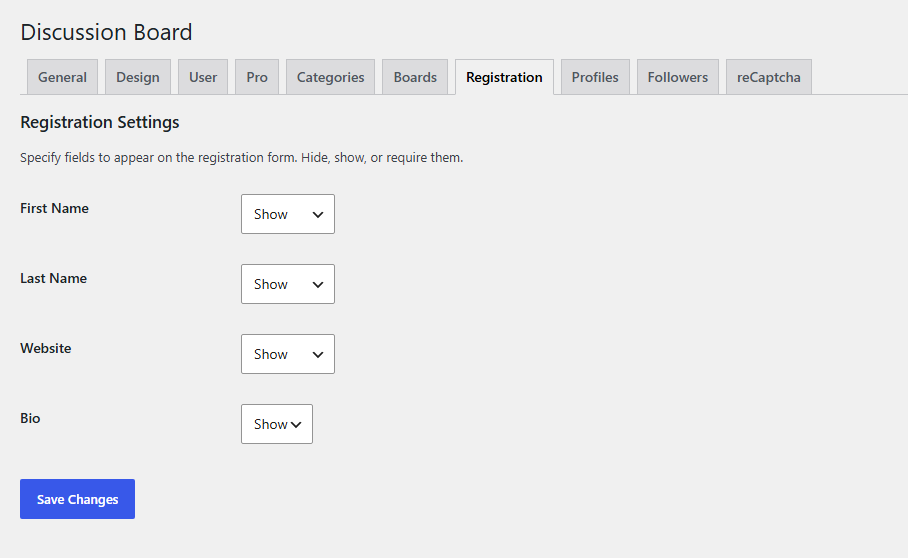
Available in the PRO version. Choose which fields are displayed on the registration form and whether they are optional or required. Set each field to Hide, Show, or Required based on your registration requirements.


